
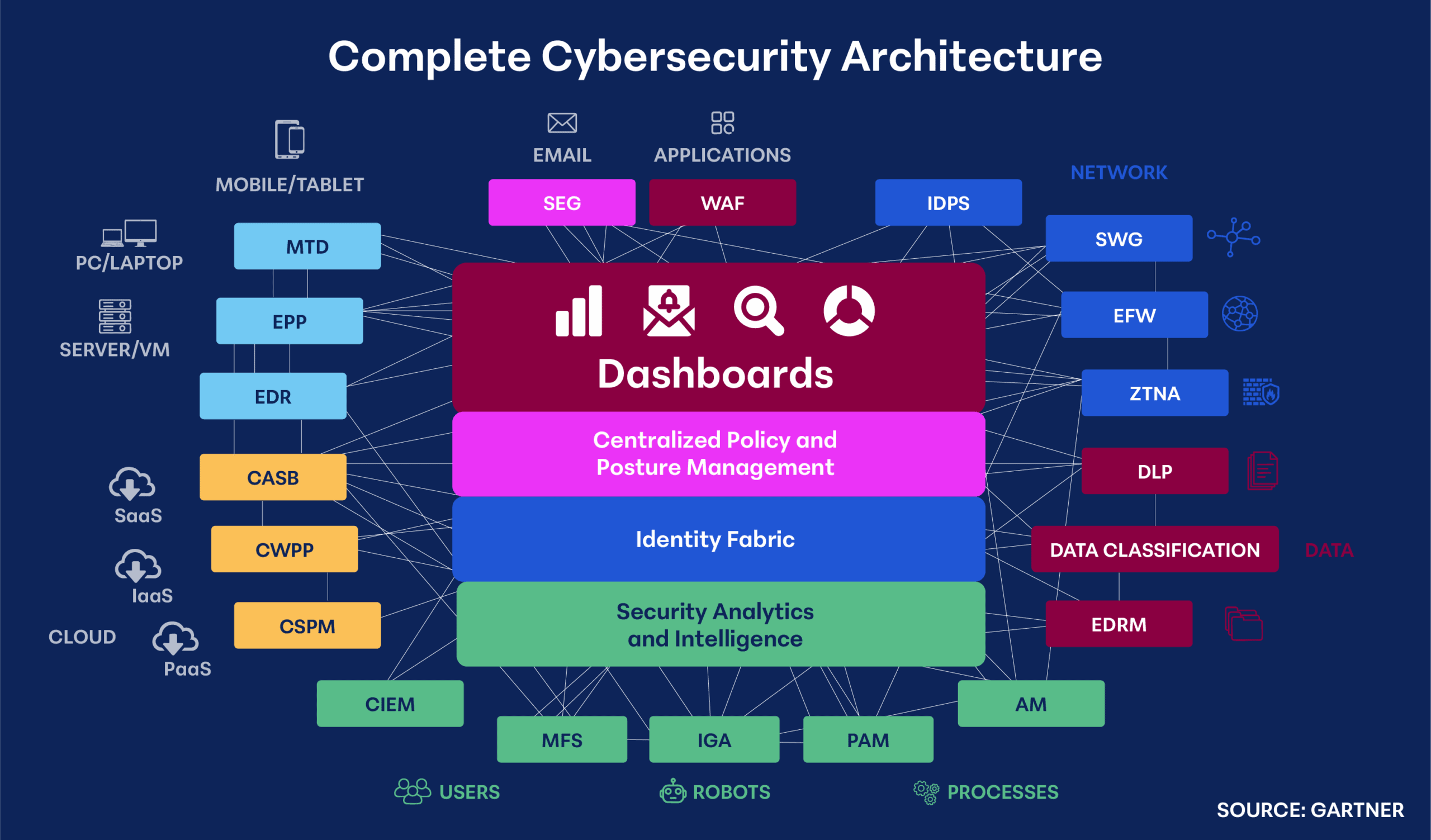
MFA – Multi Factor Authentication
Definition
Multi-Factor Authentication (MFA) is a security process that requires users to provide two or more forms of verification to gain access to an account or system. This adds an extra layer of protection beyond just a password, making it significantly harder for unauthorized individuals to access sensitive information. Factors include “something you know”, “something you have” and “something you are”. It is recommended to use MFA that crosses factors, like entering a password (something you know) and approving a push notification from applications like Duo (something you have).
Simple Explanation
Think of MFA as a double lock on your front door. Instead of just using a key (your password), you also need to provide another form of identification, like a fingerprint or a code sent to your phone. This makes it much harder for someone to break in, even if they have your key.
How to Discuss MFA
When discussing MFA, emphasize the increasing frequency and sophistication of cyberattacks. Highlight how MFA significantly reduces the risk of unauthorized access and data breaches. Explain the different types of MFA factors (something you know, something you have, something you are) and discuss the benefits of each. Address potential concerns about user inconvenience and provide solutions to overcome them. It’s important to note that MFA is required on all cybersecurity insurance applications.
DLP – Data Loss Prevention
Definition
Data Loss Prevention (DLP) is a technology that identifies, monitors, and protects sensitive data from unauthorized access, use, disclosure, or loss. It involves implementing policies and controls on classified data to prevent breaches and ensure compliance with regulations.
Simple Explanation
Think of DLP as a lockbox for your valuable data. It watches for attempts to steal or misuse sensitive information, like customer data or intellectual property. DLP blocks suspicious activities and alerts you if something looks wrong. It also protects users from accidentally sending sensitive information to where they shouldn’t be. It's like having a protective shield around your important data.
How to Discuss DLP
When discussing DLP, emphasize the increasing risk of data breaches and the potential consequences for businesses. Highlight how DLP can protect sensitive information, prevent data loss, and ensure compliance with regulations. Focus on the benefits of identifying and controlling data movement, detecting suspicious activities, and responding to incidents promptly. Use real-world examples of data breaches to illustrate the importance of DLP, how easy it is to unknowingly send confidential or identifiable information, and its potential to save your clients money and reputation.
SWG – Secure Web Gateway
Definition
A Secure Web Gateway (SWG) is a security solution that filters and monitors internet traffic to protect organizations from web-based threats. It acts as a gatekeeper, inspecting incoming and outgoing web traffic for malicious content, malware, and unauthorized access attempts.
Simple Explanation
Think of an SWG as a security guard for your internet connection. It checks every website you visit and every file you download for potential dangers. It blocks harmful websites, prevents malware from entering your network, and stops sensitive data from leaking out.
How to Discuss SWG
When discussing SWG, emphasize the growing threat of web-based attacks and data breaches. Highlight how an SWG protects against malware, ransomware, phishing, and other online threats. Focus on the benefits of improved visibility into web usage, data loss prevention, and compliance with industry regulations. Address concerns about user experience by explaining how modern SWGs can be deployed without impacting performance or productivity.
AM – Asset Management (part of a cybersecurity framework (CSF))
Definition
Asset Management within a Cybersecurity Framework involves identifying, classifying, and managing all IT assets within an organization. This includes hardware, software, data, and network components. It's about creating a comprehensive inventory and understanding the value and risk associated with each asset.
Simple Explanation
Think of Asset Management as taking a detailed inventory of everything valuable in your company. You're not just listing computers and phones, but also software, data, and even networks. Knowing what you have helps you protect it, fix problems, and make smart decisions about security.
How to Discuss AM
When discussing Asset Management, emphasize its foundational role in any cybersecurity strategy. Explain how having a clear understanding of assets enables effective risk assessment, vulnerability management, and incident response. Highlight the importance of continuous inventory management to account for changes in the IT environment. Connect Asset Management to other cybersecurity functions, such as risk management and incident response, to demonstrate its overall value.
Data Classification
Definition
Data classification is the process of categorizing data based on its sensitivity, value, and criticality to the organization. It involves assigning labels or tags to data to help determine appropriate security controls, access permissions, and retention policies.
Simple Explanation
Think of data classification as sorting your belongings. You wouldn't store your jewelry and important documents the same way as your clothes. Data classification helps you understand the value of your information and protect it accordingly.
How to Discuss Data Classification
When discussing data classification, emphasize its importance in protecting sensitive information and meeting compliance requirements. Explain how it helps organizations manage risk, reduce the impact of data breaches, and improve operational efficiency. Highlight the benefits of data loss prevention, access control, and data retention policies that are aligned with data classification. Use real-world examples of data breaches caused by mishandling sensitive data to demonstrate the value of data classification. These examples can be of employees accidentally sending confidential or personal information via email or an AI chatbot displaying intellectual property.
EPP – Endpoint Protection Platform
Definition
An Endpoint Protection Platform (EPP) is a security software suite designed to protect individual devices like computers, laptops, and smartphones (known as endpoints) from cyber threats. It typically includes antivirus, anti-malware, firewall, and intrusion prevention capabilities; however it is more reactive than proactive in nature and can only detect known malicious threats. Think of it as a comprehensive security shield for each endpoint within an organization.
Simple Explanation
EPP is like a security guard for your devices. It scans for and blocks harmful software, prevents unauthorized access, and monitors suspicious activities. It helps keep your devices safe from viruses, hackers, and other digital threats from known signatures from previous malware detections.
How to Discuss EPP
When discussing EPP with clients, focus on combining EDR (discussed next) with EPP and how they mitigate potential risks they face without it. Highlight the importance of protecting sensitive data and preventing downtime caused by cyberattacks. Explain how EPP and EDR can act as a proactive defense, detecting and containing threats before they spread to minimize impact. EPP focuses on known malicious attacks and EDR covers where EPP does not. Emphasize the peace of mind and business continuity that comes with a robust EPP and EDR solution.
EDR – Endpoint Detection and Response
Definition
EDR, or Endpoint Detection and Response, is a cybersecurity technology that monitors endpoints for malicious activity. It provides visibility into what's happening on devices, detects potential threats by recognizing anomalies, and allows security teams to respond to incidents quickly. Essentially, EDR is like a security guard for each individual computer, server, or device within an organization.
Simple Explanation
Think of EDR as a sophisticated alarm system for your computer. It learns what the user and endpoint should be doing, constantly watches for suspicious behavior (anomalies), like unauthorized access or malware. If something looks wrong, it alerts you and gives you tools to contain the threat. EDR helps protect your sensitive data and keeps your business running smoothly.
How to Discuss EDR
When discussing EDR with clients, emphasize its role in preventing data breaches and minimizing downtime. Highlight the importance of visibility into endpoint activities and the ability to quickly investigate and respond to incidents. Focus on how EDR can complement existing security solutions, like EPP, and provide an extra layer of protection.
CWPP – Cloud Workload Protection Platform
Definition
A Cloud Workload Protection Platform (CWPP) is a cybersecurity solution that safeguards applications and data running in cloud environments. It provides comprehensive protection across different cloud platforms and workload types, including virtual machines, containers, and serverless functions.
Simple Explanation
Think of a CWPP as a security fortress for your cloud applications. It shields your software from threats like malware, vulnerabilities, and unauthorized access. It’s like having a dedicated guard for each application, ensuring it stays safe and secure in the cloud. Think of it as EDR but made specifically for cloud workloads.
How to Discuss CWPP
When discussing CWPP, emphasize the increasing complexity of cloud environments and the growing threat landscape. Highlight how a CWPP provides a unified approach to securing workloads across multiple cloud platforms. Focus on the benefits of improved visibility, threat detection, and incident response capabilities. Tailor your conversation to the client's specific cloud strategy and security challenges.
CASB – Cloud Access Security Broker
Definition
A Cloud Access Security Broker (CASB) is a centralized security tool that sits between an organization and cloud service providers. It enforces security policies, protects data, and controls access to cloud applications. Essentially, a CASB acts as a security guard for cloud-based resources, ensuring they are used safely and securely.
Simple Explanation
Imagine your company uses many cloud apps like Dropbox or Salesforce. A CASB is like a traffic cop for those apps. It makes sure only authorized people can access data, prevents data leaks, and stops threats. It's like adding an extra layer of protection for your valuable cloud information, all from a single pane of glass.
How to Discuss CASB
When discussing CASB with clients, focus on the growing risks associated with cloud adoption. Just because the data is offsite and in a secured cloud environment, doesn’t mean the customer’s data or user access is secure, that is the responsibility of the customer. Highlight how a CASB can protect sensitive data, prevent breaches, and ensure compliance with industry regulations. Emphasize the importance of visibility into cloud usage and the ability to control access and enforce security policies.
CSPM – Cloud Security Posture Management
Definition
Cloud Security Posture Management (CSPM) is a technology that continuously assesses and improves a cloud environment’s security. It identifies vulnerabilities, misconfigurations, and compliance gaps, allowing organizations to take corrective actions. Essentially, CSPM provides a comprehensive view of cloud security health and helps maintain a strong security posture.
Simple Explanation
Imagine your cloud environment is a house. CSPM is like a smart home security system that constantly checks for open doors, windows, or faulty alarms. It alerts you to potential threats and helps you fix problems before they become bigger issues like exploitation. CSPM ensures your cloud house is safe and protected.
How to Discuss CSPM
When discussing CSPM with clients, focus on the challenges of managing cloud security effectively and how a “minor” change can have a major impact. Highlight how CSPM provides continuous visibility and control over cloud resources. Emphasize the importance of risk reduction, compliance adherence, and cost optimization through CSPM. Discuss real-world examples of data breaches caused by cloud misconfigurations to illustrate the value of CSPM.
CIEM – Cloud Infrastructure Entitlement Management
Definition
Cloud Infrastructure Entitlement Management (CIEM) is a cybersecurity solution that manages and controls access rights within cloud environments. It identifies and reduces excessive permissions, minimizes security risks, and ensures compliance with regulations. Essentially, CIEM helps organizations protect sensitive data by granting only necessary access to users and applications through least-privilege.
Simple Explanation
Imagine your cloud environment as a building with many rooms. CIEM is like a security system that controls who has keys to which rooms. It makes sure people only have access to the areas they need to do their jobs. This prevents unauthorized entry and protects valuable information.
How to Discuss CIEM
When discussing CIEM, emphasize the importance of identity and access management in cloud security. Highlight the risks associated with excessive permissions, such as data breaches and compliance violations. Explain how CIEM can help reduce these risks by enforcing the principle of least privilege. Focus on the benefits of improved security posture, reduced compliance burdens, and increased operational efficiency.
PAM – Privileged Access Management
Definition
Privileged Access Management (PAM) is a security solution that protects and controls access to high-value systems and data. It safeguards privileged accounts like administrators, reduces the risk of unauthorized access, and ensures compliance with security regulations.
Simple Explanation
Imagine PAM as a vault within a vault. It protects the most sensitive keys to your digital kingdom. By controlling who and how long someone can access these powerful accounts and monitoring their activities, PAM helps prevent data breaches and maintains the security of your organization.
How to Discuss PAM
When discussing PAM, emphasize the critical nature of privileged accounts and the potential damage from a breach since they have greater access than typical user accounts. Highlight how PAM provides strong protection for sensitive systems and data. Focus on the benefits of reducing risk, improving compliance, and enhancing overall security posture. Address concerns about cost and complexity by explaining the potential financial losses from a data breach and the ROI of implementing PAM.
IDPS – Intrusion Detection/Prevention System
Definition
An Intrusion Detection and Prevention System (IDPS) is a security technology that monitors networks for malicious activity and can monitor or block attacks in real-time. It identifies suspicious patterns, anomalies, and potential threats to protect systems and data. It’s important to differentiate detection vs prevention. Detection will monitor and notify while prevention will block.
Simple Explanation
Think of an IDPS as a security guard with the power to act. It watches for intruders trying to break into your network, sounds an alarm when something suspicious happens, and can even stop the intruder in their tracks. It’s like having a proactive defense system for your digital assets.
How to Discuss IDPS
When discussing IDPS, emphasize the importance of proactive threat protection and the limitations of traditional firewalls. Highlight how IDPS can detect and prevent a wider range of attacks, including zero-day threats. Focus on the benefits of improved threat visibility, reduced risk of data breaches, and increased compliance. Address concerns about false positives and performance impact by explaining the advanced detection capabilities and optimization features of modern IDPS solutions.
WAF – Web Application Firewall
Definition
A Web Application Firewall (WAF) is a security application that filters and monitors HTTP traffic to protect web applications from attacks such as SQL injection, cross-site scripting (XSS), and other vulnerabilities. It acts as a shield between the web application and the internet.
Simple Explanation
Imagine your website as a store. A WAF is like a security guard at the entrance who inspects everyone coming in to make sure they're not trying to steal anything. It blocks harmful attempts to break into your website and protects your customers' information.
How to Discuss WAF
When discussing WAFs, emphasize the increasing frequency and sophistication of web application attacks. Highlight how a WAF can protect against common vulnerabilities and reduce the risk of data breaches. Focus on the benefits of improved security posture, compliance adherence, and business continuity. Address concerns about performance impact by explaining the advanced features and optimization capabilities of modern WAF solutions.
MTD – Mobile Threat Defense
Definition
MTD is software that protects against attacks made specifically for mobile devices and operating systems such as Apple iOS and Google Android. Hackers may also use malware, phishing or network attacks to compromise a user's device, which could then be used to steal data or to purposely cause a negative business impact. MTD's goal is to protect users from such occasions.
Simple Explanation
Mobile Threat Defense is like a security system for your smartphone. Just like you might have a security alarm for your home to protect against burglars, MTD protects your phone from hackers, viruses, and other bad things that can harm your device, steal your personal information, or infect files sent to other business systems. It monitors your mobile device for suspicious activity, blocks harmful apps and websites, and helps keep your data safe
How to Discuss MTD
When discussing Mobile Threat Defense with clients, it’s important to understand what their “mobile footprint” is. Do employees use mobile devices to access corporate data in addition to personal information? If so, this is a huge attack vector that could lead to a compromise if there is no protection in place.
EDRM – Electronic Discovery Reference Model (framework for e-discovery)
Definition
The Electronic Discovery Reference Model (EDRM) is a framework outlining the key stages involved in the e-discovery process, which is used in data gathering for legal proceedings. It provides a standardized approach to identifying, collecting, processing, reviewing, analyzing, and producing electronically stored information (ESI) to maintain chain of custody.
Simple Explanation
Think of EDRM as a roadmap for navigating the complex world of e-discovery. It breaks down the process into steps, making it easier to understand and manage. By following this roadmap, organizations can handle legal disputes more efficiently, effectively, and ensure chain of custody requirements are followed for evidence in legal cases.
How to Discuss EDRM
When discussing EDRM, emphasize its role in improving e-discovery efficiency and how it helps organizations manage legal risks and meet regulatory requirements. Highlight the benefits of using a standardized framework for collaboration between legal and IT teams. Also, focus on how EDRM can help clients streamline their e-discovery processes and improve their overall legal readiness.
ZTNA – Zero Trust Network Access
Definition
Zero Trust Network Access (ZTNA) is a security model that assumes no user or device is inherently trustworthy. It requires continuous verification before granting access to resources, regardless of location. ZTNA replaces traditional network perimeters like VPNs with granular access controls, protecting against internal and external threats.
Simple Explanation
Imagine your company as a fortress. Traditionally, you'd have a big gate (firewall) protecting everything inside. ZTNA is like having tiny gates for each room, requiring specific keys (authentication) every time someone wants to enter. No one is trusted until proven otherwise, making it much harder for intruders to gain access and if they do then it’s tough for them to get anywhere else (containment).
How to Discuss ZTNA
When discussing ZTNA, emphasize the increasing risk of cyberattacks and the limitations of traditional network security models. Highlight how ZTNA provides a more secure and flexible approach to protecting sensitive data and applications. Focus on the benefits of improved visibility, granular access controls, and reduced attack surface making it much harder for threat actors. Address concerns about complexity and cost by explaining the potential financial impact of a data breach and the long-term value of ZTNA.
EFW – Enterprise Firewall
Definition
An Enterprise Firewall is a network security device that monitors and controls incoming and outgoing network traffic based on predefined security rules. It acts as a barrier between an internal network and the external internet, protecting against unauthorized access, malware, and other cyber threats. The latest next generation firewalls include features such as intrusion detection and prevention, deep packet inspection, and layer 7 application control.
Simple Explanation
Think of an Enterprise Firewall as a security guard for your company's network. It inspects everyone (or every device) trying to enter or leave the building, checking if they're allowed and if they're carrying anything suspicious. This helps keep your valuable data and systems safe from harm.
How to Discuss EFW
When discussing Enterprise Firewalls, emphasize their critical role in protecting against external threats. Highlight the importance of balancing security with network performance. Focus on features like intrusion prevention, application control, and advanced threat protection. Discuss how a robust firewall can help clients meet compliance requirements and protect their reputation. Remember to tailor your conversation to the specific needs and challenges of each client.
SEG – Secure Email Gateway
Definition
A Secure Email Gateway (SEG) is a security appliance or software that filters and scans incoming and outgoing emails for threats like spam, malware, phishing, and data loss. It acts as a gatekeeper, protecting the organization's email infrastructure and users.
Simple Explanation
Think of an SEG as a high-tech mailroom. It inspects every incoming and outgoing email for suspicious content, like junk mail or viruses. It blocks harmful emails and delivers safe ones to your inbox. It's like having a dedicated security team for your email.
How to Discuss SEG
When discussing SEGs, emphasize the increasing volume and sophistication of email-borne threats through Social Engineering. Highlight how an SEG protects against data breaches, ransomware, and business disruption. Focus on the benefits of improved email security, increased productivity, and compliance adherence. Address concerns about false positives and email delivery issues by explaining the advanced threat detection capabilities and user-friendly management tools of modern SEGs.
IGA – Identity Governance and Administration
Definition
Identity Governance and Administration (IGA) is a framework that manages and controls user identities and access privileges across an organization. It ensures the right people have the appropriate access to systems and data, while minimizing security risks and compliance issues.
Simple Explanation
Imagine IGA as a digital bouncer for your company. It decides who gets into which rooms (systems) and what they can do once they're inside. It keeps track of everyone, makes sure they have the right keys (permissions), and removes those keys when they're no longer needed.
How to Discuss IGA
When discussing IGA, emphasize the growing complexity of managing user identities and access rights. Highlight how IGA can streamline processes, reduce security risks, and ensure compliance with regulations. Focus on the benefits of automating tasks, improving visibility into user access, and reducing the risk of data breaches, and if one occurs then minimizing the impact. Use real-world examples of data breaches caused by identity mismanagement to illustrate the importance of IGA.